Offline reminders & notes · RenOff

RenOff: reminders and notes offline, local, privacy first.

No cloud. No account. No telemetry. Free.
Local database: %LOCALAPPDATA%\RenOff\renoff.db

Offline Local SQLite No account Privacy first
Single list

Notes and to-dos in one place, simple, immediate and fully customizable.

Call accountant · Note Today
Insurance renewal · To-do Tomorrow
Bills reminder · Snooze In 2h
Weekly list · Review Recurring
Low ambition, clear principles: offline, local, essential. Tray + notifications Snooze / Dismiss IT/EN Light/Dark theme SQLite Easy backup Fast startup No account
Features · 02

Simple by design, built for daily use.

RenOff is designed for everyday use: add, review, complete. Everything stays on your PC, in a structure that remains simple and immediate. RenOff helps you remember to read your reminders.

Offline-first

No internet required: no login, no external services, no forced sync. Predictable behavior even in “air‑gapped” environments.

Local data, transparent format

Your data is stored locally in SQLite. Easy backups and full control: you know where your data is and can archive it without a cloud account.

One list: notes + to‑dos

A single view reduces friction. Fast input, quick editing, and a structure that stays lightweight over time.

Reminders with quick actions

Per-item reminders with Snooze/Dismiss actions. Tray and popup notifications to avoid missing events.

Configurable review loop

Beyond deadlines: periodic nudges to review pending items so your list doesn’t turn into noise.

Always available, not intrusive

Close-to-tray keeps it ready without clutter. Light/Dark theme and Modern/Classic UI style for practical customization.

Secure export
Export notes and reminders in one click from Settings and move the file to a second device.
ZeroCrypt + ZeroDrop Encrypt the file with ZeroCrypt and transfer it securely with ZeroDrop.
How it works · 03

Remember → Reminder → Review: a lightweight flow.

RenOff reduces friction: write quickly, set a reminder when needed, and regularly review what is still pending.

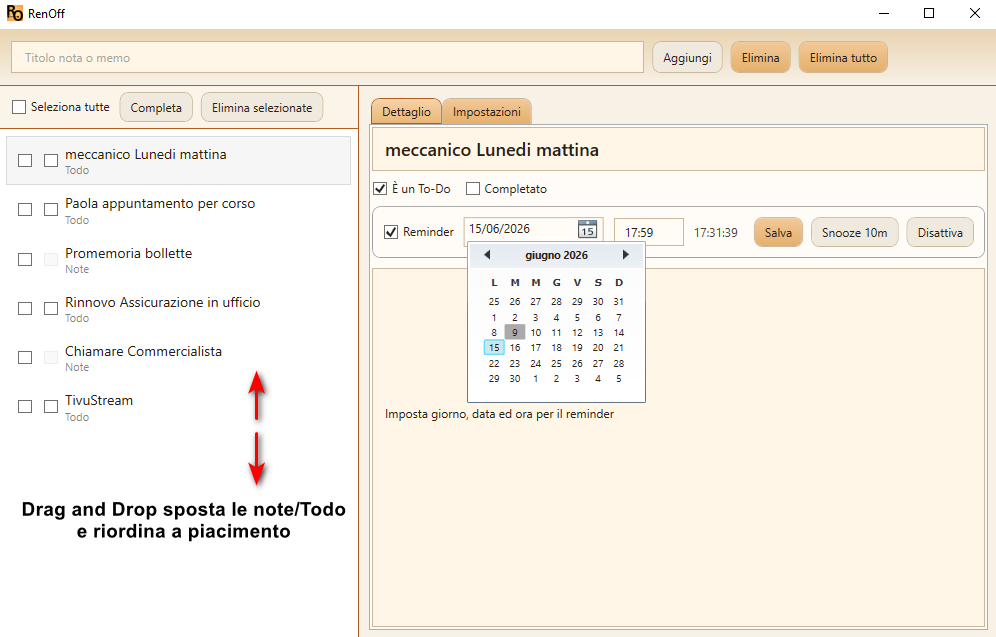
RenOff main screen.
Usage flow
"Write a note or a to-do, add a reminder when needed, then use the review loop so your list does not silently pile up."
RenOff logo
1) Remember
Quickly add notes and to-dos
2) Reminder
Snooze or dismiss with quick actions
3) Review
Configurable periodic nudge
Offline
Always available, even without network
See the features
FAQ · 04

Common questions, concrete answers.

Short answers about local data, offline use and backups.

FAQ
“Do my data go online?”
Answer
No: RenOff is offline-first and stores data locally on your PC.
FAQ
“Where is the database stored?”
Answer
On Windows: %LOCALAPPDATA%\RenOff\renoff.db
FAQ
“How do I back up and restore?”
Answer
Use Export/Import in Settings or back up renoff.db while the app is closed.